
Phishing (GMGN Metric): Supply from Transfers, Not Buys
GMGN's metrics card has a number. Lots of people think it's about fake links, but it's not. This lesson covers what the number means, why it shows up, and how to check it.

What Does It Measure?
- = the percentage of the token's held by labeled suspected phishing.
- These wallets got their tokens through a transfer from another wallet, not by buying. GMGN's tooltip: "The tokens were not bought; they were transferred in".
- Example: Phishing 6.9% = about 6.9% of the supply sits in wallets that never bought the token.
Note: it's called "Phishing", but this is not about fake sites or scam links. For account security and fake links, see lesson 1.4 (the Account Security section).
How to See It on GMGN
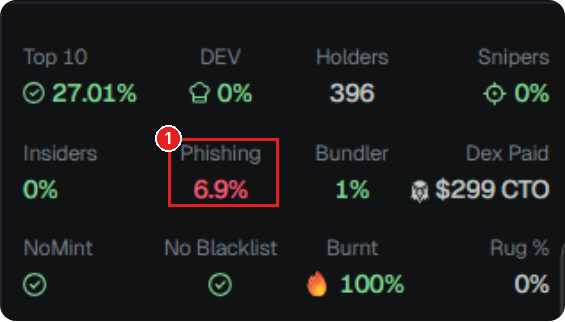
- Open the token page on GMGN. On the metrics card, look for the Phishing number ①.
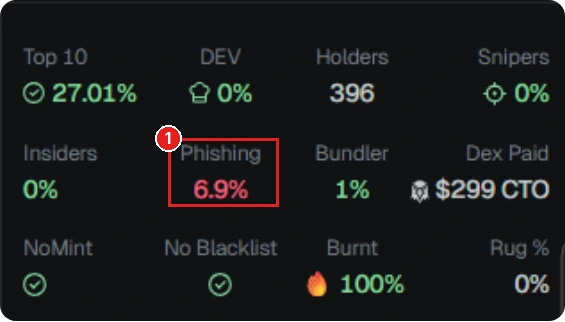
Token metrics card on GMGN: ① the Phishing number (6.9%, red). The number is only an example, data at the time of the screenshot. Token is only an example, not a recommendation. (Screenshot: GMGN, red box added) - Hover over the number to read its tooltip.
- Open the tab and look for wallets with a red fishing hook icon next to their address. If you hover over the icon, the tooltip says "Suspected phishing wallet, token transfer detected". To be quick, click the filter icon in the Wallet column header, and the Filter Wallet popup shows up. Under Filter Tag, pick Phishing (all the options: , , Phishing, Diamond Hands, Paper Hands, Bot), then click Apply. No login needed. You can try this filter, but sometimes it comes back empty (GMGN's filters aren't always consistent). If that happens, just scroll the Holders tab and look for the icons one by one. Look at the Remaining column (what percentage they hold and whether they're still holding).
Don't mix them up: the blue fish icon next to the SOL balance is just the wallet's SOL balance tier (around $1k to $5k), it has nothing to do with phishing.
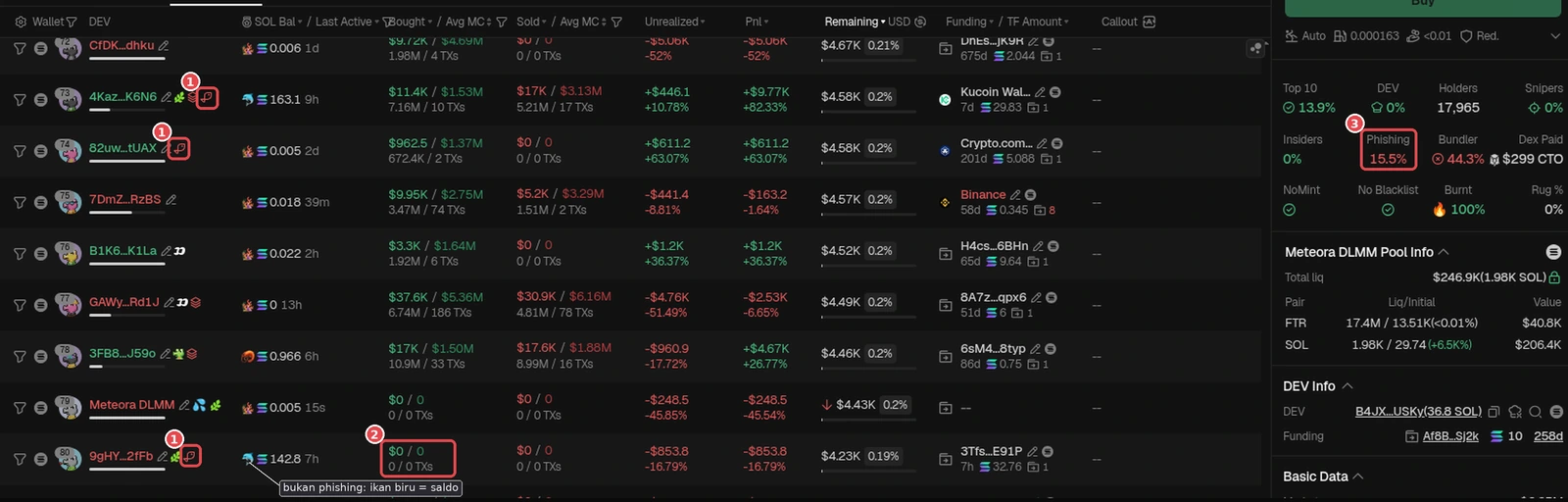
Real example, token FTR: ① red fishing hook icon on 3 wallets (4Kaz…K6N6, 82uw…tUAX, 9gHY…2fFb). ② Wallet 9gHY…2fFb: Bought $0 / 0 TXs but Remaining is still 0.19%, so the tokens in this wallet came in purely through transfers. The other two wallets also show buys, so the hook icon means a token transfer was detected, not that everything came from transfers. ③ Phishing 15.5% on the metrics card. The blue fish in the SOL Bal column (gray label) is just a balance tier, not phishing. GMGN screenshot (Oct 18, 2026), numbers at the time of checking. Token is only an example, not a recommendation. - Look at the Bought column on that wallet's row. If it's empty ($0 / 0 TXs) but the Remaining column still shows a balance, the tokens in that wallet came in through a transfer, they weren't bought.
- Want to see where the tokens were sent from? Copy the wallet address, open it on Solscan (solscan.io), then look at the Transfers tab. It shows which wallet the tokens came from and when.
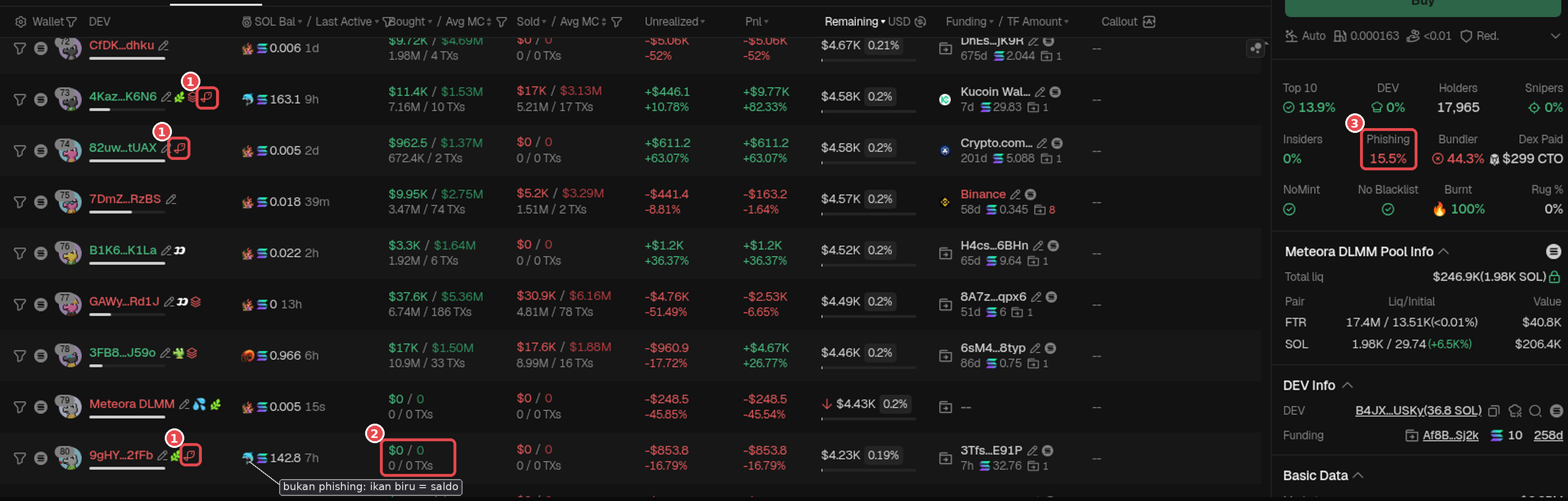
Quick icon guide for the Holders tab (checked Oct 18, 2026, may change if GMGN updates):
- Red fishing hook = Phishing (tokens came in through a transfer).
- Black "DD" icon = .
- Green leaf = (a new wallet).
- Blue drop = Pool Contract (the pool contract, not a regular holder).
- Person icon (outline) = Top Holder.
- Link icon + number in the column = Shared Funding (several wallets funded from the same source, the number = how many wallets).
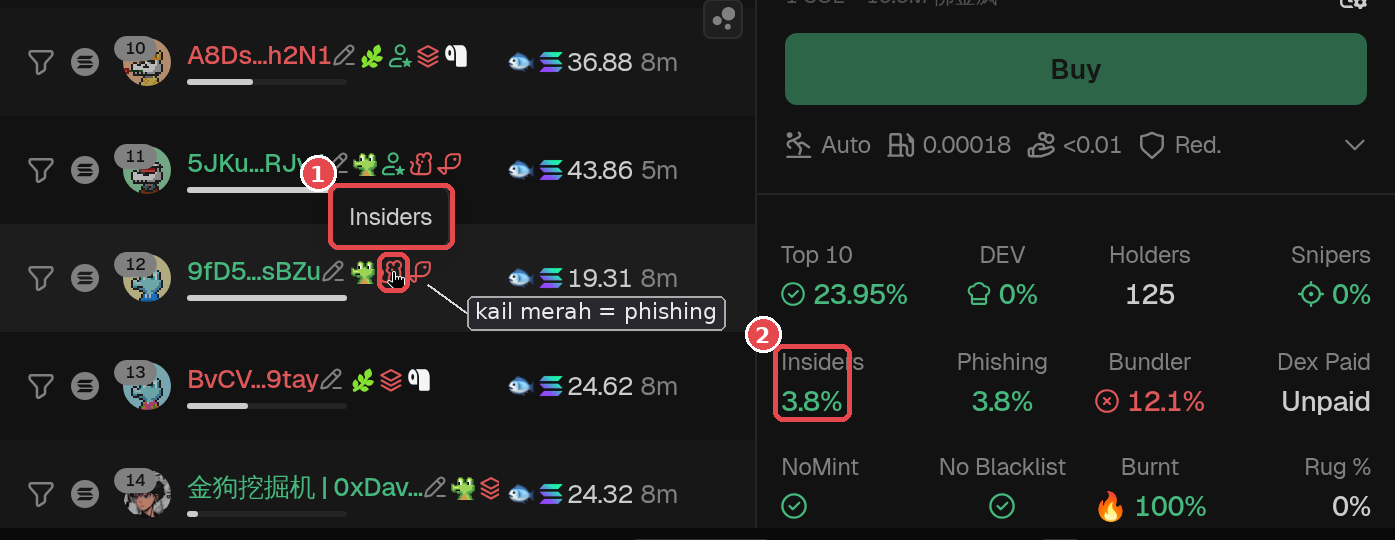
- Insider icon (red, next to the address) = Insiders. Hover over the icon and the tooltip says "Insiders". A real example is in the Insiders section below (token SRoD).
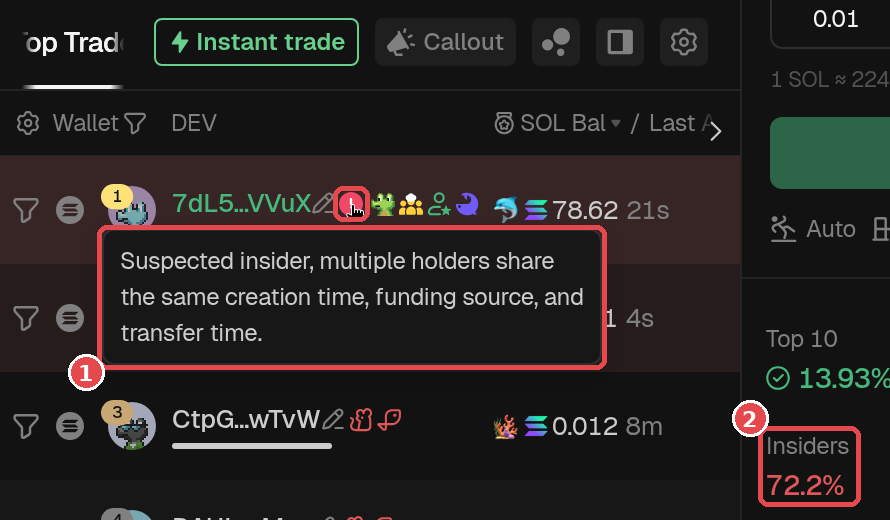
- Red "!" icon = Suspected Insider. Its tooltip: "Suspected insider, multiple holders share the same creation time, funding source, and transfer time" (example in the Insiders section below).
- Crosshair icon = . Shows up on wallet rows and on the metrics panel (lesson 2.7).
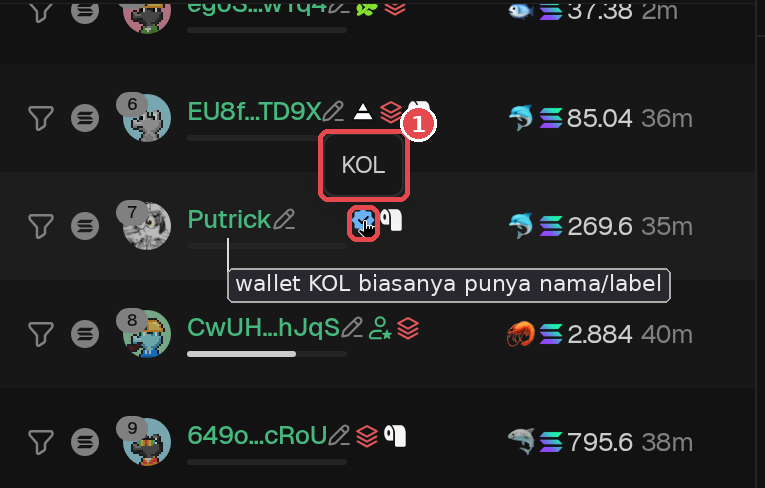
- Blue badge next to a wallet name = a wallet labeled by GMGN. Usually shown with a name, not an address.
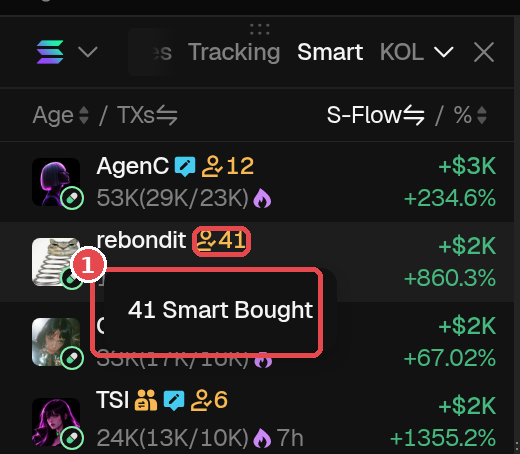
- Yellow person icon + number = Smart Bought: the number of wallets labeled by GMGN that have bought the token. This is a token-level signal (the Monitor > Smart menu), not a label on a wallet row.
- Blue fish = the wallet's SOL balance tier, not phishing.
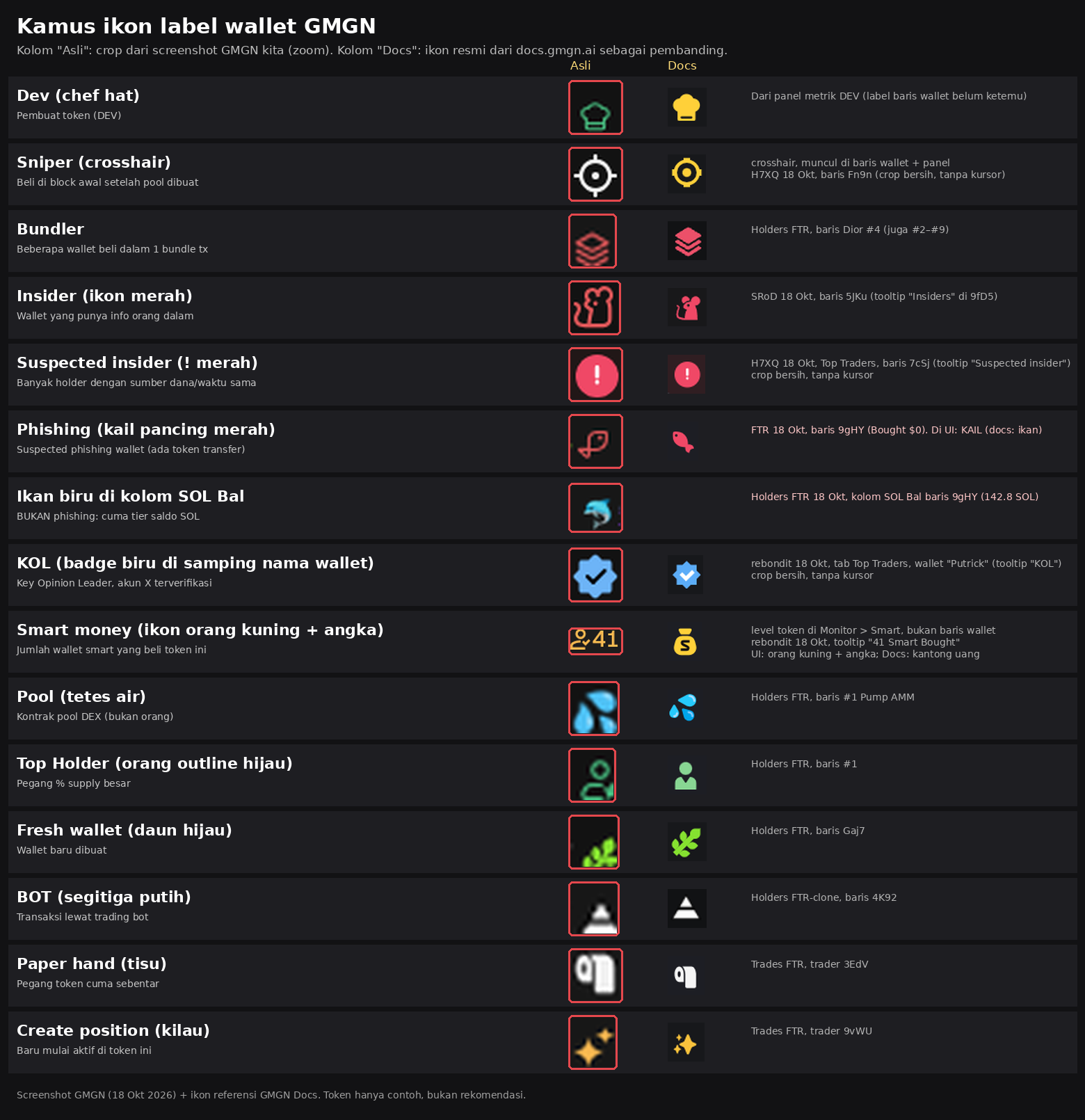
KOL and Smart Money labels: not a guarantee. GMGN also labels wallets it considers KOLs (influencers/well-known accounts) or Smart Money (wallets that often profit). These labels are only markers, not a guarantee the token is low or will go up. KOLs and smart money can sell first too, and a KOL wallet can get free tokens through a transfer (see Red flags below). Don't just follow them; if you want to track wallets like this, check their history first (lesson 3.5: 3.5 Advanced Wallet Tracking: Find Your Own Smart Money Wallets).
Why Does It Happen?
- The dev/team distributes tokens: the dev or team sends tokens to the wallets of members, partners, or marketing.
- Airdrops: tokens are handed out for free to many wallets, for example to the community.
- Insiders hiding supply: instead of holding everything in one wallet (easy to spot in DEV or Top 10), the supply gets split up by transferring it to many wallets.
- Multi-wallet: one person moves tokens to wallets they own, so it looks like there are lots of holders (lesson 3.5).
- Airdrops to KOLs: the dev sends tokens to the wallets of KOLs or well-known wallets, so retail thinks the KOL bought in.
According to GMGN Docs, fake holders (tokens spread from one source to many wallets) and airdrops to KOLs are two tricks that often make this label show up.
A High Number Isn't Always Dangerous
- Official airdrops to the community or transparent team allocations also push this number up.
- People moving tokens from an old wallet to their own new wallet can get counted too.
- GMGN doesn't publish its exact formula, so a flagged wallet isn't necessarily malicious.
- What makes it dangerous: the transferred supply is big, still held, and held by one group that can sell together.
Cross-Check
- (lesson 2.9): are the phishing wallets connected into one ? Add up their percentage.
- Bundler (lesson 2.8): is there also a pattern of buying together? Bundler and Phishing both big = lots of supply in the hands of a few people.
- Funding (lesson 2.6): were those wallets funded with SOL from the same source, at a similar time?
- Add up DEV + Insiders + Bundler + Phishing. If the total is big, ask yourself: "Am I ready if they all sell at once?"
Insiders: Phishing's Close Cousin
On the GMGN metrics card, the Insiders number is on the second row, right to the left of Phishing. Both measure supply that may be held by "insiders".
- Insiders = the percentage of supply held by insider wallets. According to GMGN Docs, an Insider is a wallet that has inside information and held the token early.
- GMGN also has a Suspected Insider label: several holders whose wallets were created at the same time, funded from the same source, and received transfers at the same time.
- GMGN Docs also gives an example insider pattern: wallets that didn't buy after trading opened but hold the token. It could be the dev's supply split across many wallets so it can be sold quietly. Real projects usually distribute tokens through an announced airdrop, so check the project's official X.
- The higher the number, the more you should watch out. But GMGN itself says insider/sniper data is not guaranteed to be real-time, it's only for reference.
How to check Insiders:
- Look at the Insiders number on the token's metrics card.
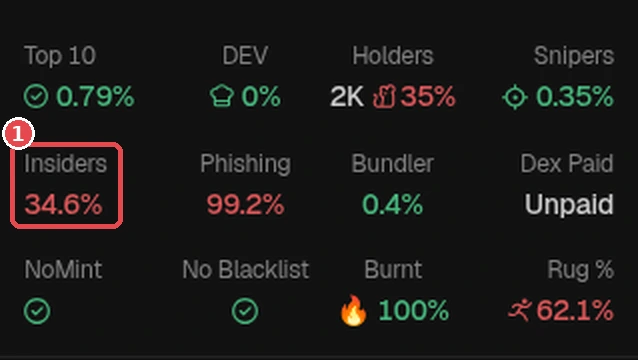
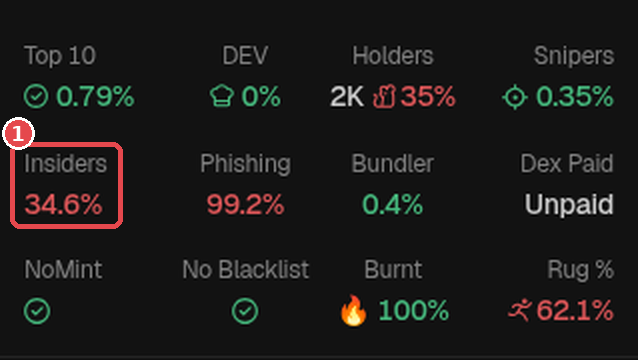
Real example, token ADP: ① Insiders 34.6% (red). On the same card, Phishing is 99.2% and Bundler only 0.4%, so "insider" supply can be big even when Bundler is small. GMGN screenshot (Oct 18, 2026), numbers at the time of checking. Token is only an example, not a recommendation. - In the Holders tab, click the filter icon in the Wallet column header → the Filter Wallet popup → under Filter Tag pick Insiders → Apply. You can try this filter, but sometimes it comes back empty (GMGN's filters aren't always consistent). If that happens, just scroll the Holders tab and look for the icons one by one. Check the Remaining column (still holding?) and Bought (empty = got it through a transfer). Insider wallets are marked with a red icon next to their address; hover over the icon and the tooltip says "Insiders". Tell it apart from the red "!" icon = Suspected Insider: GMGN suspects this wallet is part of a group that was created, funded, and received token transfers at the same time.
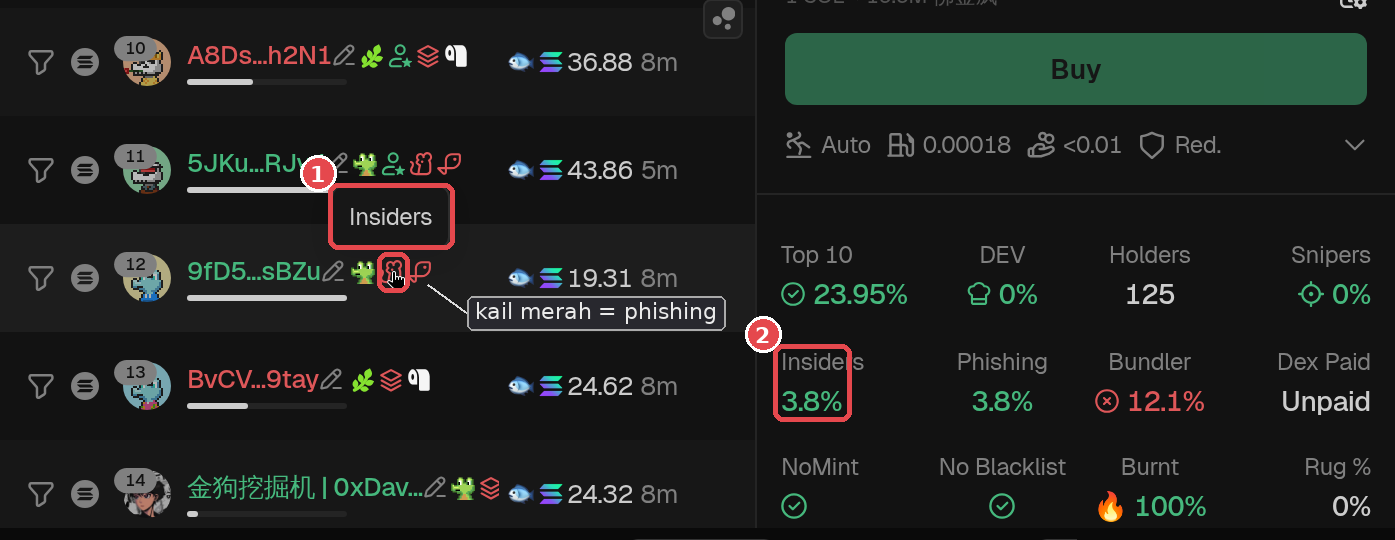
Real example, token SRoD: ① hover over the red icon next to wallet 9fD5…sBZu and the tooltip "Insiders" appears (image zoomed 200%). That's the Insider icon. ② Total Insiders on this token is 3.8%. Gray label: the red hook next to it = phishing, so one wallet can have more than one label. GMGN screenshot (checked Oct 18, 2026, logged out), numbers at the time of checking. Token is only an example, not a recommendation. 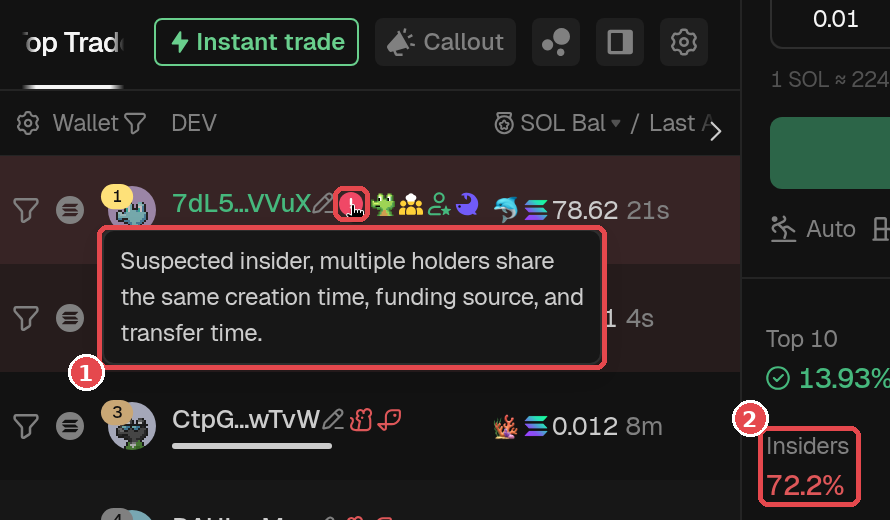
Suspected Insider example (token H7XQ, Top Traders tab): ① red "!" icon next to wallet 7dL5…VVuX, tooltip "Suspected insider, multiple holders share the same creation time, funding source, and transfer time". ② Total Insiders on this token is 72.2%. It's a warning sign to be careful, not a prediction that the price will drop. GMGN screenshot (checked Oct 18, 2026, logged out), numbers at the time of checking. Token is only an example, not a recommendation. - Funding (lesson 2.6) and Bubblemaps (lesson 2.9): do those wallets share one funding source or one cluster?
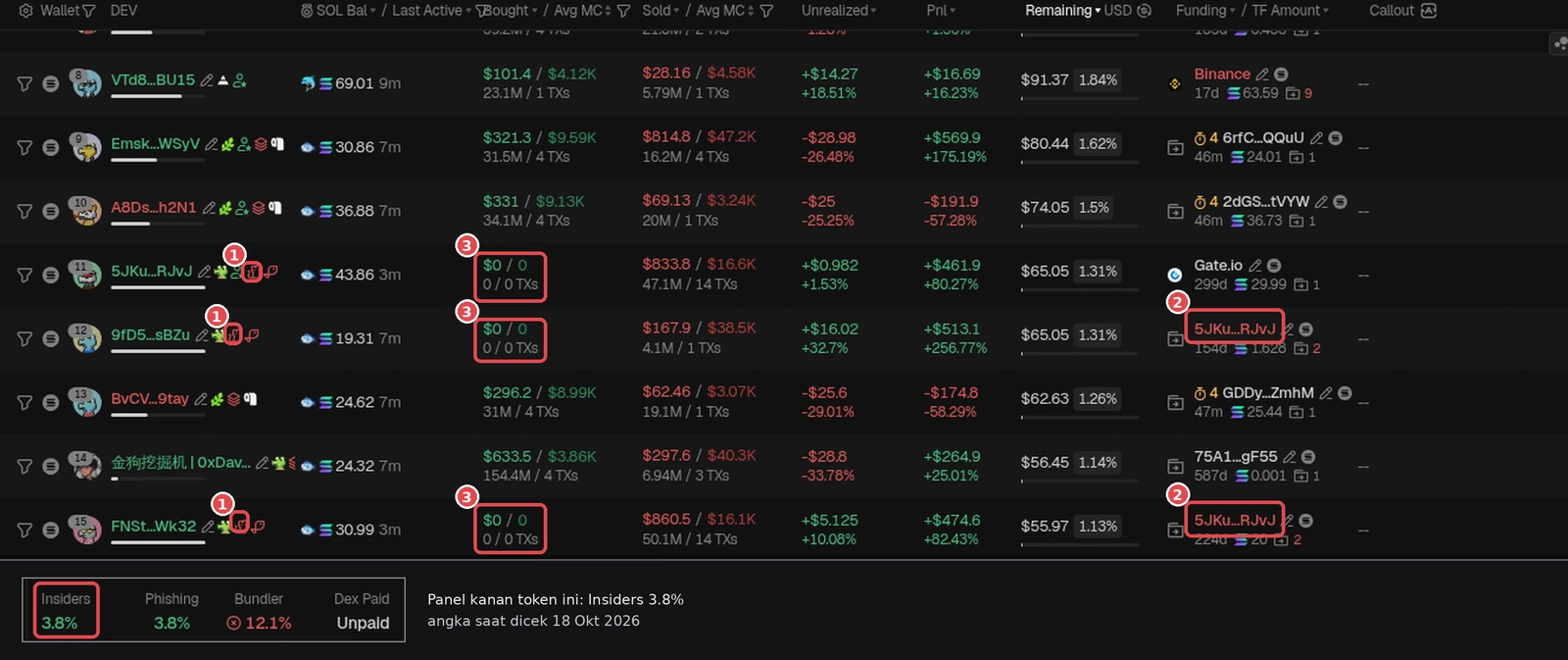
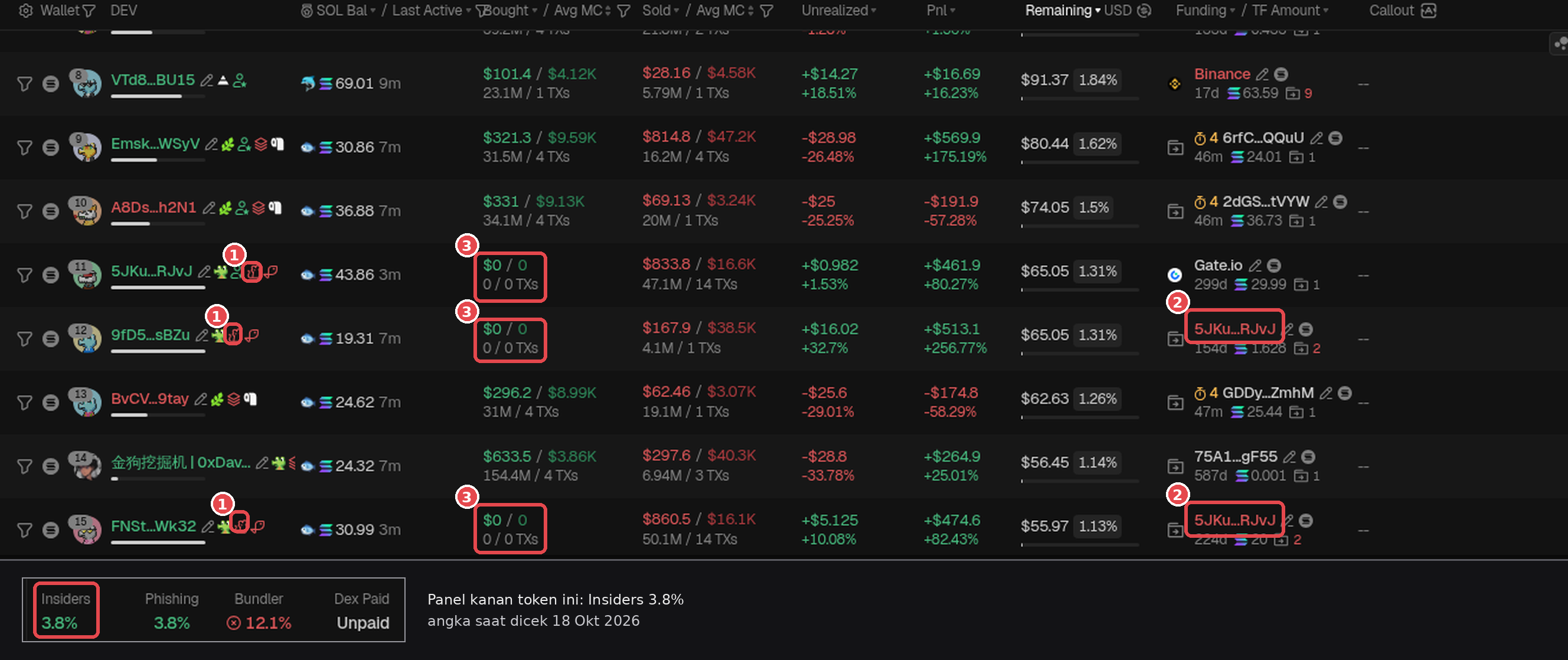
Insider cluster example on token SRoD: ① three wallets marked Insider (5JKu…RJvJ, 9fD5…sBZu, FNSt…Wk32). ② Funding column: 9fD5 and FNSt were both funded with SOL from 5JKu…RJvJ, so they look connected (check Funding in lesson 2.6 and clusters in lesson 2.9). ③ All three show Bought $0 / 0 TXs, they never bought but hold the token, and still sold (the Sold column has values). Inset: Insiders 3.8%. This 'one funding source + got tokens without buying' pattern is what makes GMGN suspect insiders. Not a prediction, just a sign to be careful. GMGN screenshot (checked Oct 18, 2026, logged out), numbers at the time of checking. Token is only an example, not a recommendation.
- Insiders 0% or small, or there's a matching official airdrop announcement.
- Insiders big and still holding, one funding source, or small DEV but big Insiders (the dev's supply can be "hidden" in other wallets).
Green flags & Red flags
Green flags
- Small Phishing, or the transferred wallets are already empty and the price stays stable.
- There's a clear explanation (an official airdrop, an announced team allocation), and the wallets aren't one cluster.
Red flags
- Big Phishing and still holding.
- Phishing wallets in one cluster on the bubble map or with one funding source.
- A KOL wallet holds the token with no buy history, and is then used for promotion like "KOL X is in".
Summary
- Phishing (GMGN metric) = the percentage of supply in wallets that got the token through a transfer, not by buying. In the Holders tab, they're marked with a red fishing hook icon.
- A high number can come from an official airdrop or team allocation, or from insiders hiding supply. The dangerous case: big, still held, and held by one group.
- Cross-check with Bubblemaps, Bundler, Funding, and Insiders, then size your position. KOL and Smart Money labels aren't a guarantee either.
Common mistakes
- Thinking the blue fish in the SOL Bal column means phishing. It's just a SOL balance tier.
- Calling every phishing label malicious without checking the context.
- Believing "KOL X is in" when that KOL wallet got the token through a transfer with no buy history.
"Invisible" supply is a hidden risk. Pick the smallest possible risk, and don't let greed make you skip this check.
Next up, lesson 2.14: 1-Minute Checklist Before .
Not financial advice.
Progress is saved in this browser.