
Bundler
A common trick on : one person buys a big chunk of early using many at once, so it looks like lots of different buyers. That's a .

What is a Bundler?
Simply put: one person can have several wallets that buy together. One person holding many wallets is covered further in lesson 3.5 (Advanced/Tips): 3.5 Advanced Wallet Tracking: Find Your Own Smart Money Wallets.
According to GMGN, a bundle happens when transactions from many wallets are combined into one package in the same block. Those wallets are labeled Bundler. The difference from : bundlers are strongly suspected of being run by one party.
How to check
- On GMGN, look at the Bundler number on the token's metrics card.
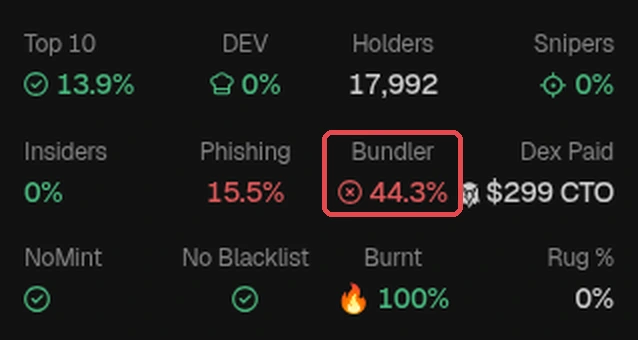
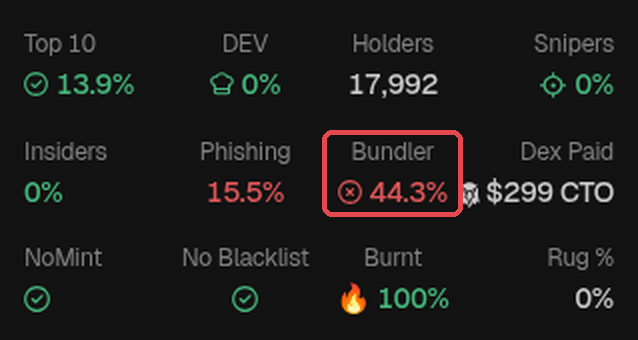
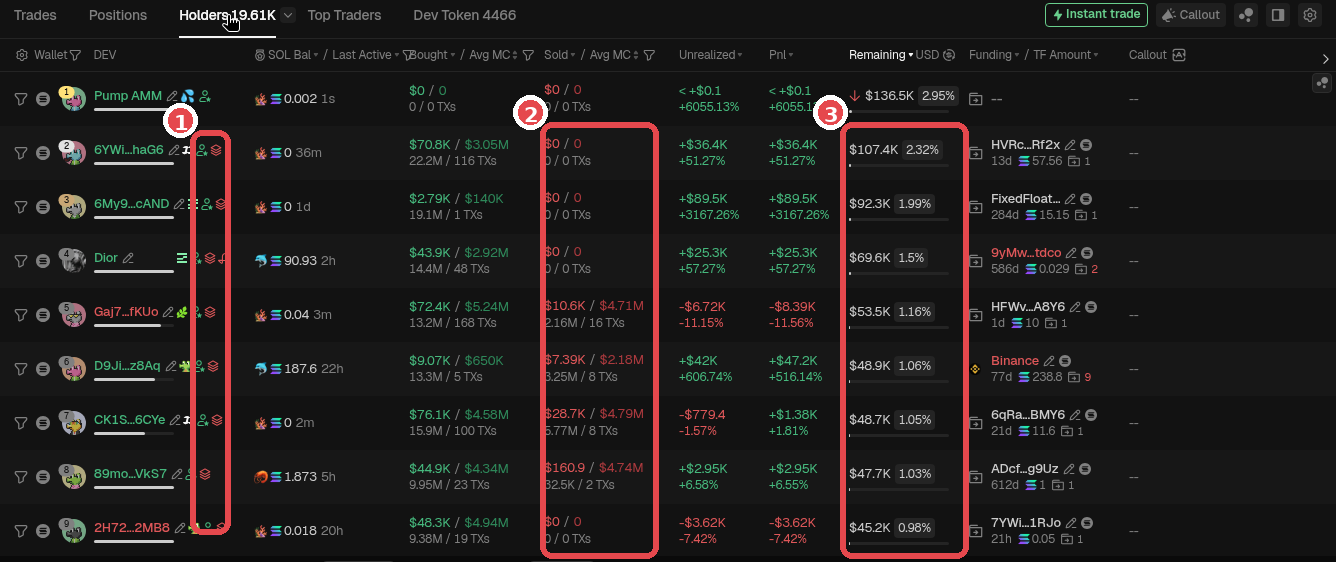
Example token FTR, checked on the morning of Oct 18, 2026: red box on Bundler 44.3% (red), even though is 0% and Top 10 is 13.9%. DEV looks small, but the bundler share is big. The Bundler number only counts tokens still held by bundle wallets, so it can drop to 0% after they sell (FTR itself was already 0% when checked again at 10:12 WIB, Jakarta time), and that doesn't mean the token is clean. GMGN screenshot (Oct 18, 2026), numbers at the time of checking. Token is only an example, not a recommendation. - In the tab, look for wallets with the Bundler label icon next to their address (GMGN Docs it Bundled Tx Wallet). To be quick, click the filter icon in the Wallet column header → the Filter Wallet popup → under Filter Tag pick Bundler → Apply (no login needed). You can try this filter, but sometimes it comes back empty (GMGN's filters aren't always consistent). If that happens, just scroll the Holders tab and look for the icons one by one. Look at the Remaining column: still holding or already sold?
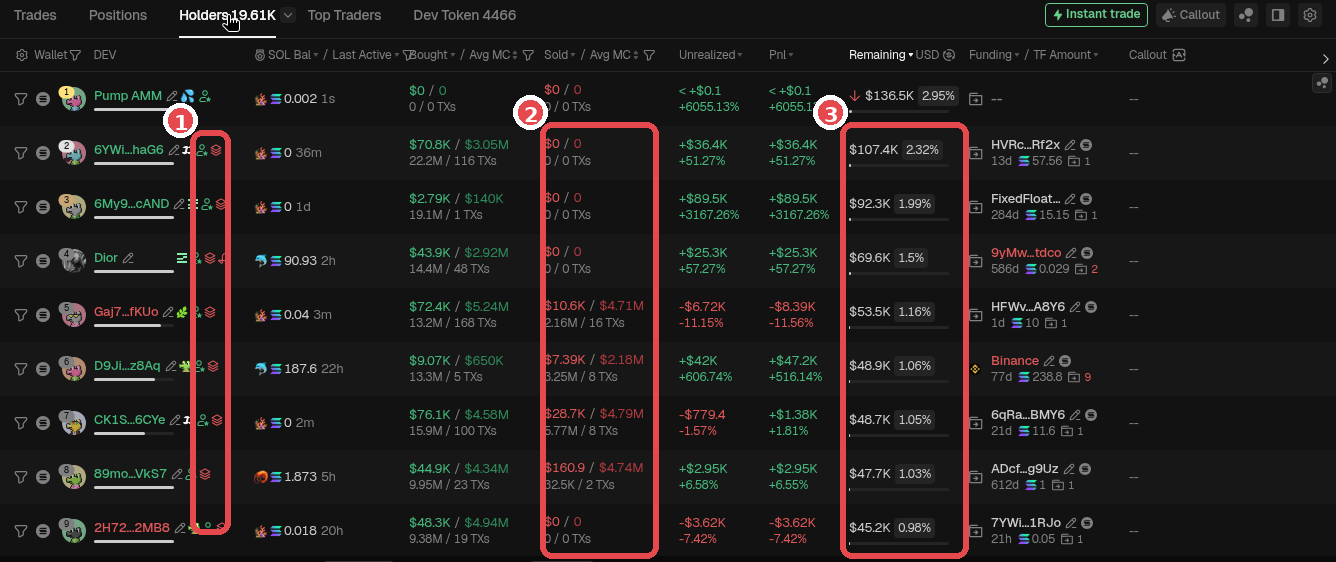
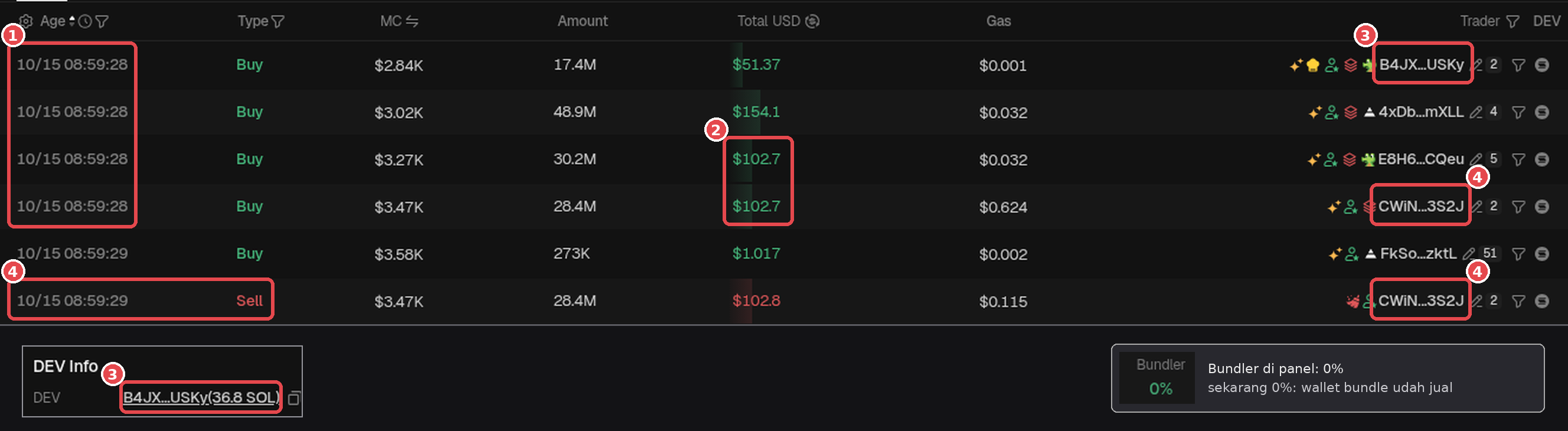
Holders tab of token FTR: ① Bundler label icon next to the addresses of holders #2 to #9, ② Sold column (some are still $0 = haven't sold), ③ their Remaining percentage. GMGN screenshot (Oct 2026). Token is only an example, not a recommendation. - Check the Trades tab (transactions / txs). The Age column means how long ago the transaction happened (1s = 1 second ago), so the top one is the latest transaction. To see the earliest transactions: on the chart, scroll to the very first when the token launched, then click that candle. The Trades tab then shows only the transactions in that candle (the same trick is in lesson 3.5). Then look for these signs:
- Same timing: lots of buys in the same second or block.
- Same gas / : identical fees across wallets.
- Same amount: the buy (or later sell) amounts are the same or nearly the same.
These signs show up often, but they don't all have to be there. Gas/fees aren't always the same (in the FTR example below, the gas varies), so the main guide is same timing and similar amounts.
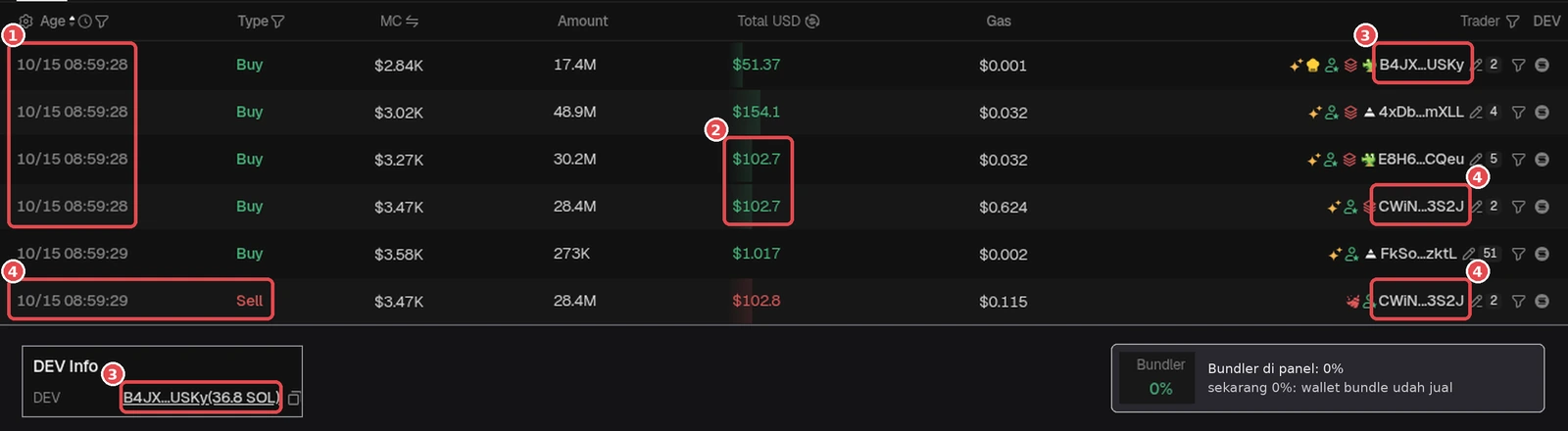
Real example, token FTR, earliest transactions: ① the first 4 Buys came in at 10/15 08:59:28, the same second, from 4 different wallets. ② Two buys have exactly the same amount, $102.7 (E8H6…CQeu and CWiN…3S2J). ③ B4JX…USKy = the DEV wallet (same address as in DEV Info), also buying in the same second. ④ CWiN…3S2J sold just 1 second later (08:59:29). Gray inset: the panel now shows Bundler 0% (checked Oct 18, 2026). The gas in this example varies, so same fees aren't a requirement. GMGN screenshot (Oct 18, 2026), numbers at the time of checking. Token is only an example, not a recommendation. - Click a few suspicious wallets, then compare with (lesson 2.9) and (lesson 2.6). If the funding source is the same, the case for one person gets stronger.
vs Good Bundlers vs Bad Bundlers
A token with bundlers isn't automatically bad. What matters is how they behave:
- Good bundlers: usually hold the floor. They hold, or even buy more when the price dips.
- Bad bundlers: nuke. They sell all together and the price drops hard in an instant.
The problem is, you can't know from the start which kind they are. So watch their behavior and size your position accordingly. Ask yourself: "Am I ready if they all sell at once?"
In this illustration the bundlers turn out to be bad. They still hold 30%. Guess when they'll nuke (all sell at once): drag the marker or tap the chart in the gray area, then lock in your guess.
Bundler Detection Can Be Wrong
On Solana, bots that happen to buy in the same block when a new token launches can get labeled Bundler too. So the Bundler % number can look bigger than it really is. Treat this number as a signal, not a verdict, then with Bubblemaps and Funding.
Green flags & Red flags
Green flags
- Bundlers were small from the start, or they've exited and the price stays stable. Remember: Bundler 0% isn't necessarily clean, it can also mean the bundle wallets have sold everything. Check the history in the Trades tab.
- Bundlers are still holding and look like they're holding the floor (buying the dips).
Red flags
- Big bundlers still holding, especially with one funding source.
- Small DEV but big bundlers: ownership can be hidden.
- Bundlers have sold together before and the price dropped right away.
Summary
- Bundler = several wallets buying together in one bundle, often run by one party.
- Check the Bundler number, the Bundler labels in the Holders tab, and the Trades tab. The main guide is same timing and similar amounts; gas/fees aren't always the same.
- Bundler % is a signal, not a verdict. Cross-check with Bubblemaps and Funding, then ask: "am I ready if they all sell at once?" High bundlers = bigger , not that the token can't .
Common mistakes
- Thinking Bundler 0% must be clean. It can also mean the bundle wallets have sold everything.
- Seeing a small DEV and forgetting about big bundlers. Add up the dev, bundlers, and insiders.
- Waiting until every sign (timing, fees, amounts) matches exactly before getting suspicious.
Your job isn't to guess whether the bundlers are good or bad, it's to keep your loss small if they turn out to be bad. Don't go in big out of greed.
Next up, lesson 2.9: Bubblemaps.
Not financial advice.
Progress is saved in this browser.