
Dev Supply / Tokens Locked
The holds tokens from the very first second. The question is: how many, and do they tend to run?

What is Dev Supply?
DEV is the percentage of held by the dev's (the token creator). Tokens Locked means part of the tokens is locked until a certain date and can't be sold yet.
How to check
- On GMGN, look at the DEV number on the metrics card and open DEV Info.
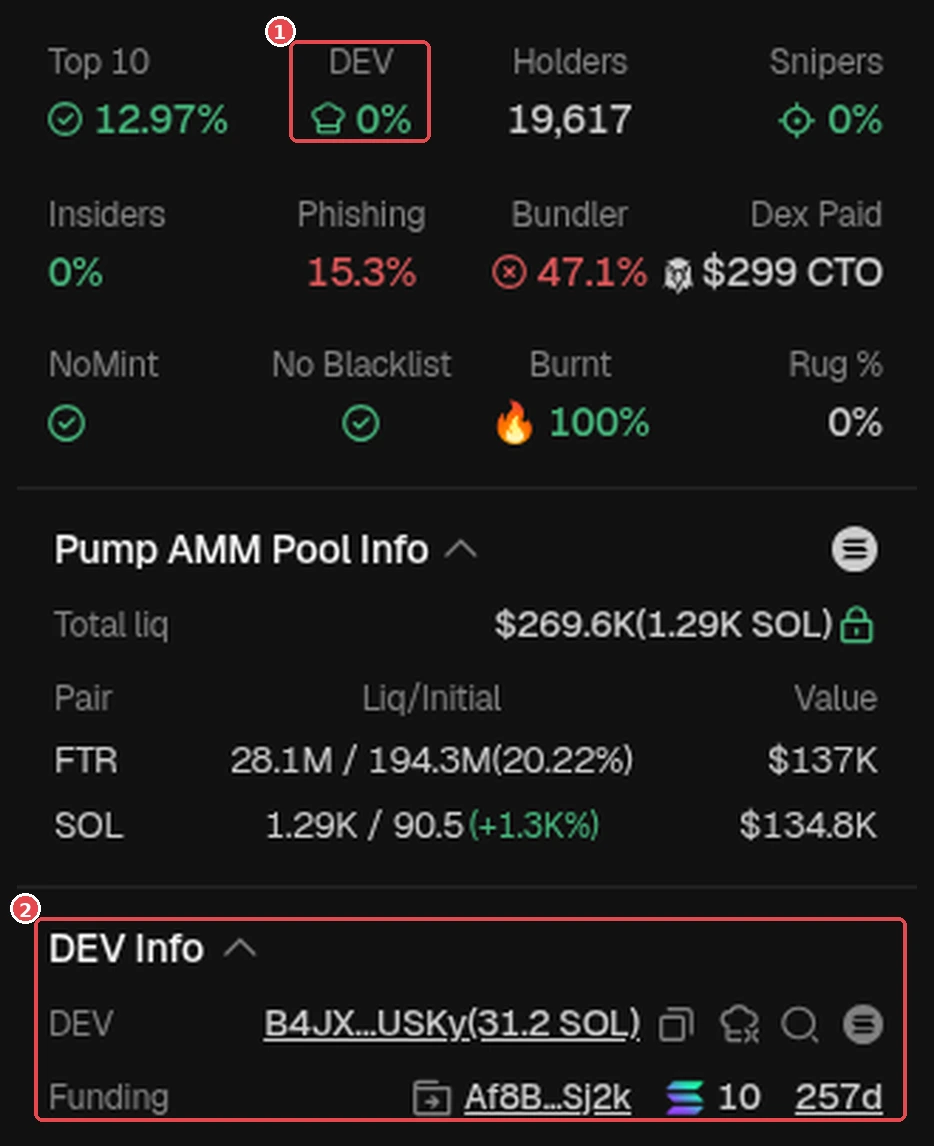
GMGN panel (example token FTR): ① DEV 0%, ② DEV Info with the dev's wallet and its . GMGN screenshot (Oct 2026). Token is only an example, not a recommendation. - Look at the dev's status: Hold, Buy More, Sell Part, Sell All, or Transferred (moved to another wallet, worth being suspicious of). Dev data you can see:
- DEV % on the metrics card: the percentage of supply the dev still holds.
- DEV Info (right panel): the dev's wallet address, its balance, and Funding (where its money came from).
The author's opinion/experience: A dev sell on a meme coin usually isn't a big deal. On a tech coin, a dev sell is more often a red flag because the dev might run (abandon the project). But it's not certain, there are some tech coins where the dev sold and the price still went up. So look at the context, don't panic right away.
- Check the dev's history: how many tokens they've created and how many died. Open the Dev Token tab below the chart, then look at Token Stats: Total Pairs, Migrated, and Non Migrated. Non Migrated doesn't automatically mean a , but if almost all of the dev's tokens never migrated, treat it as High (a sign to be careful, not a prediction).
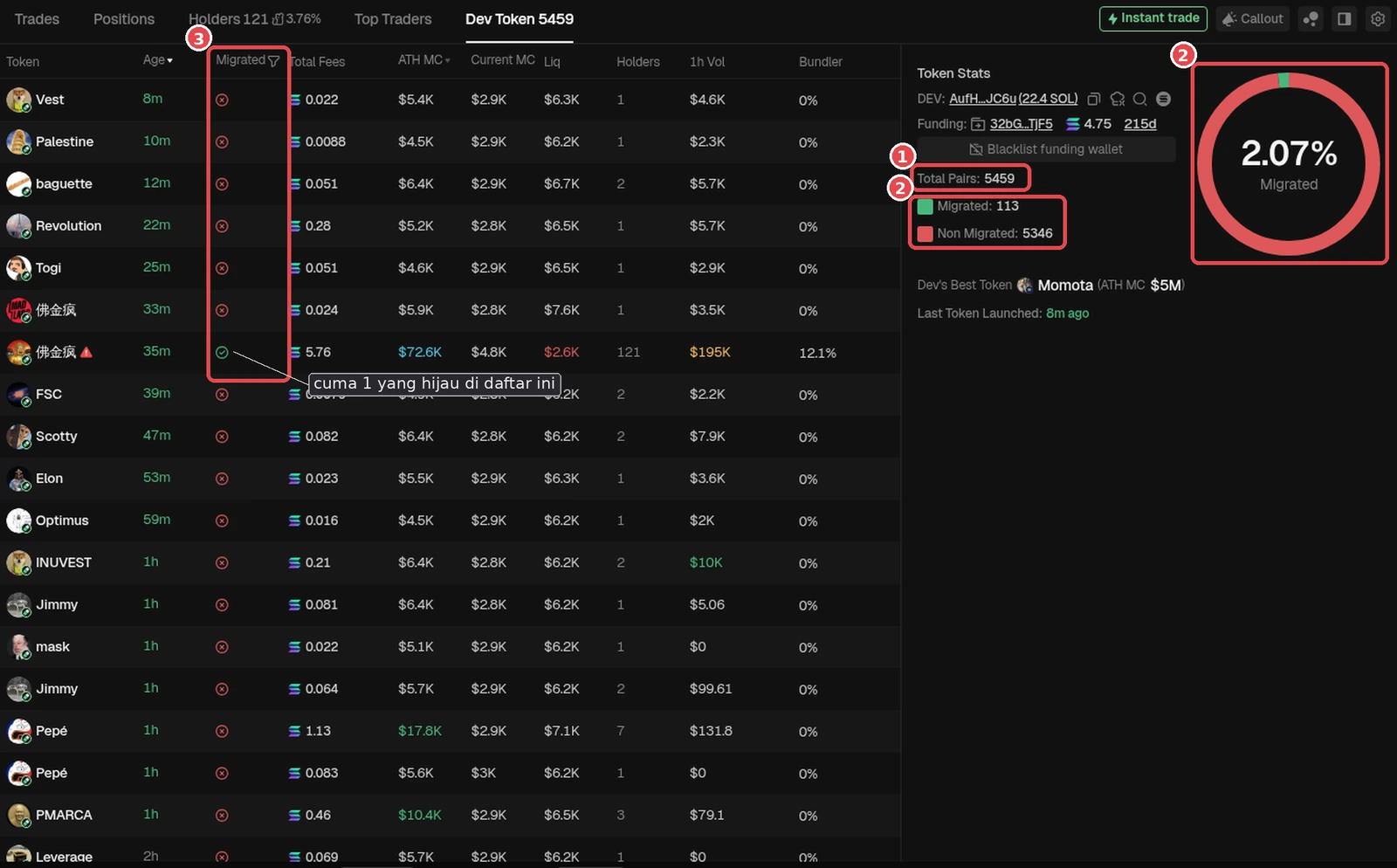
Dev Token tab for token SRoD (dev AufH…JC6u): ① Total Pairs 5459, this dev has created 5,459 tokens. ② Migrated 113 vs Non Migrated 5346, donut 2.07% Migrated. ③ Migrated column in the list: almost all red, only 1 green on screen. Non Migrated means the token hasn't/didn't to a , not automatically a rug. But thousands of tokens with only 2.07% migrated = a 'token factory' dev pattern: High Risk, not a prediction. GMGN screenshot (checked Oct 18, 2026, logged out), numbers at the time of checking. Token is only an example, not a recommendation.
Green flags & Red flags
Green flags
- A small DEV share and a clean dev history.
Red flags
- A big DEV share that isn't locked.
- The dev often launches tokens and then quickly hits Sell All (a serial rugger).
- The dev has hundreds/thousands of tokens and almost all are Non Migrated (example above: 5,459 tokens, only 2.07% migrated). High Risk, not a prediction.
- Transferred status to lots of new wallets.
Summary
- Check DEV % on the metrics card and open DEV Info (dev address, balance, Funding).
- Look at the dev's status: Hold, Buy More, Sell Part, Sell All, or Transferred (worth being suspicious of).
- Check the dev's history in the Dev Token tab. If almost all their tokens are Non Migrated, treat it as High Risk (not a prediction). Devs who tend to run usually repeat the same pattern. A clean dev history is no guarantee the price goes up either.
Common mistakes
- Only looking at a small DEV %, then forgetting to check where the dev's tokens went (Transferred).
- Panicking at every dev sell without looking at the context (meme vs tech).
- Skipping the dev history check.
Don't let greed make you forget to check the dev. The smallest possible risk always comes first.
Next up, lesson 2.6: Funding / TF Amount.
Not financial advice.
Progress is saved in this browser.